
How to manage your subscription
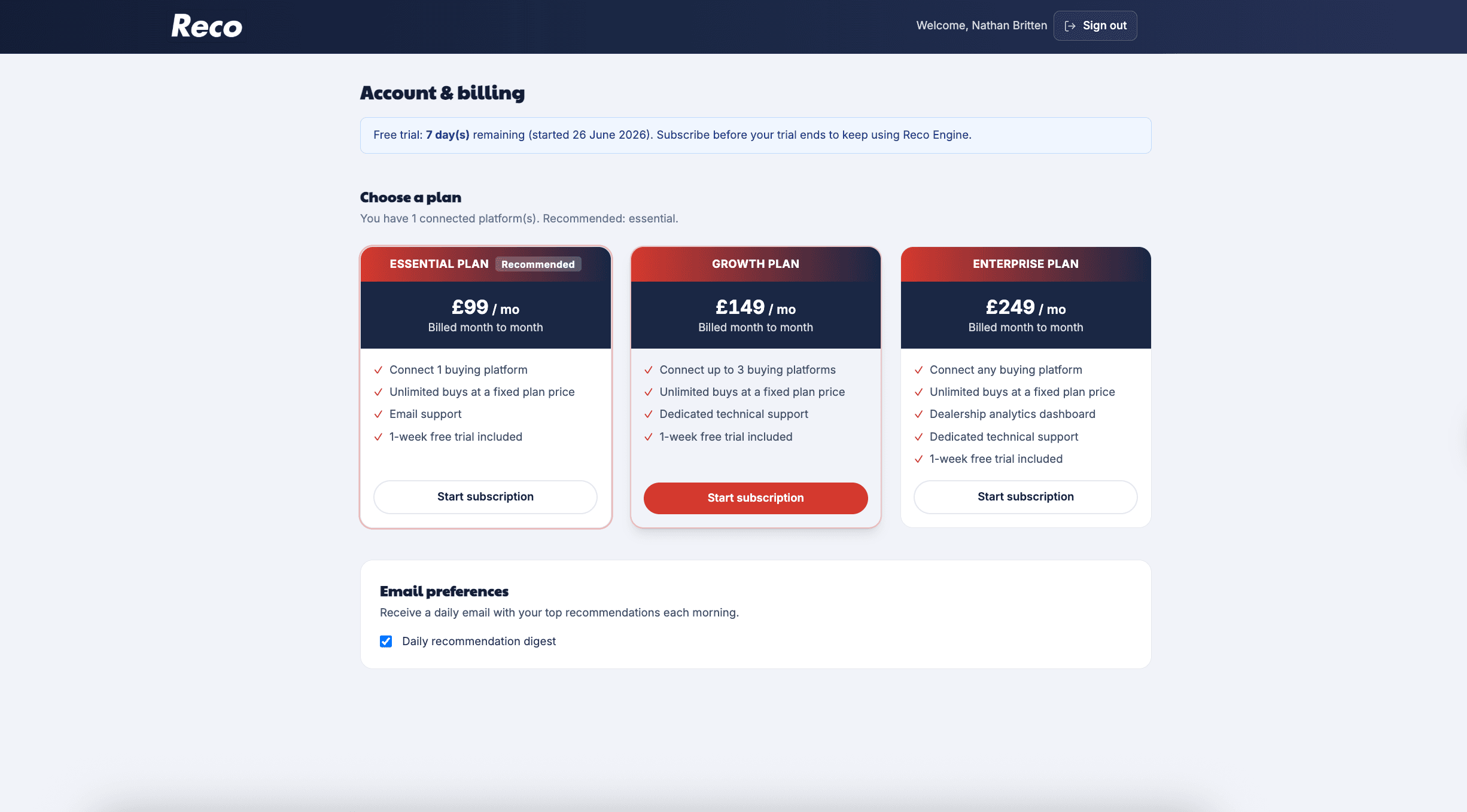
All billing is managed from Account & billing in the sidebar. From there you can subscribe, change plan, update payment details, and view billing history.
Free trial
Reco includes a 7-day free trial from your first sign-in. No card is required to start.
During the trial you have full access to recommendations, buying rules, and integrations (within your plan's platform limit). Subscribe before the trial ends to keep using Reco without interruption.
When the trial expires, you will be prompted to subscribe on the Account page. Recommendations and insights are locked until you have an active subscription, but you can still access Settings, Account, and Need help?.
Compare plans on our pricing page.
Plans and platform limits
| Plan | Monthly price | Platforms |
|---|---|---|
| Essential | £99/mo | 1 |
| Growth | £149/mo | 3 |
| Enterprise | £249/mo | Unlimited |
Your plan determines how many buying platforms you can connect at once. See how to add an integration for the connection walkthrough.
Subscribing for the first time
- Go to Account & billing.
- Under Choose a plan, select Essential, Growth, or Enterprise.
- Click Start subscription (or Choose platforms & subscribe if you have more integrations connected than your chosen plan allows).
- If prompted, pick which platforms to keep in the Choose platforms to keep modal — the others will be disconnected.
- Complete payment in Stripe Checkout.
After successful payment you are redirected back to Account with a confirmation message. Your subscription is active immediately.
Upgrading your plan
If you are already subscribed and want more platforms or Enterprise features:
- Go to Account & billing.
- Click Switch via billing portal on the plan you want.
- Stripe opens the billing portal where you confirm the change.
Upgrades typically take effect immediately. Stripe handles any prorated charge for the remainder of your billing period.
Downgrading your plan
Downgrades work differently from upgrades:
- Switch plan via the billing portal as above.
- Reco shows a pending change message: "Downgrading to [tier] on [date]. You'll stay on [current tier] until then."
- The downgrade takes effect at the end of your current billing period — you keep full access on your current plan until that date.
If the new plan allows fewer platforms, remove extra integrations in Settings → Integrations before the switch date. Reco does not automatically disconnect platforms for you.
Cancelling your subscription
Cancellation is handled in the Stripe billing portal via Manage billing:
- Click Manage billing on the Account page.
- In the portal, choose to cancel your subscription.
- Cancellation is scheduled for the end of your billing period — you keep full access until that date.
To reactivate before the period ends, use Manage billing again. Reco shows: "Your subscription cancels on [date]. You'll keep full access until then."
Billing history and payment method
Click Manage billing to open the Stripe Customer Portal where you can:
- Update your payment card
- Download invoices
- View upcoming charges
Your invoice history also appears on the Account page under Billing history.
Locked out?
You may lose access to recommendations if:
- Your trial ended and you have not subscribed — subscribe on the Account page.
- You have more platforms connected than your plan allows — trim integrations in Settings or upgrade your plan.
Settings and Account remain accessible when locked out so you can fix the issue.
Next steps
- How to add an integration — connect platforms within your plan limit
- How to add a buying rule — set exclusions once you are subscribed
Need help? If you are logged in, open Need help? in the sidebar and message our team. If you are not logged in, email team@recoengine.co.uk.